
Add Rapidflare to a Wix site
To add the Rapidflare agent to a Wix site, paste a short piece of code into Settings → Custom Code. You do not edit your pages.
What you need
- A published site with a connected domain. Wix requires this for custom code (Wix's article). A connected domain needs a Premium or Studio plan (Wix's article).
- A publishable API key with your connected domain on its allowed list. See What you need.
Wix says Custom Code is the same in Wix Editor, Wix Studio and Wix Harmony. We tested the chat button on Wix Harmony.
Add the chat button

- In your site's dashboard, click Settings.
- Under Development & integrations, click Custom Code, then + Add Custom Code.
- Paste this code. Replace
YOUR_PUBLISHABLE_API_KEYwith your publishable key.
<script src="https://cloud.rapidflare.ai/storage/v1/object/public/rapidflare-embed-sdk/latest/agent.js"></script>
<script>
	window.rapidflare.init({
		apiKey: 'YOUR_PUBLISHABLE_API_KEY',
		display: { type: 'floating-launcher', position: 'bottom-right' }
	});
</script>
- Name it, choose All pages and Body - end, and click Apply.
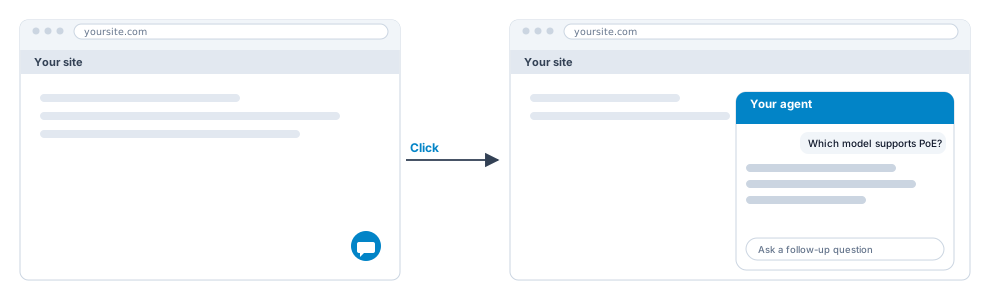
Open your published site in a private window. Custom code does not run in the Wix editor.
Other ways to show the agent on Wix
The chat button needs nothing on your pages, so it works from Custom Code alone. The other ways to show the agent, such as a search bar, a full-page agent, an AI overview or your own button, each need a specific spot on a page that the code can find. Wix generates element IDs and class names dynamically, and Wix says code that targets them may break when a site is published or updated. For that reason this guide gives no copy-and-paste steps for them on Wix. Contact support@rapidflare.ai and we will help you set one up. The options are described in the Web deployment guide.
If something does not work
| What you see | What it usually means | What to do |
|---|---|---|
| Nothing appears | You are in the editor, the code is switched off, or the site is not published | Open the published site in a private window. In Custom Code, check the code's switch is on and All pages is chosen. |
| An error instead of an answer | Your domain is not on the key's allowed list | Add your connected domain to the key. |
| It stopped after you changed domain | Wix deletes your code when you assign a different domain | Add the code again and update the allowed list. |
| Some visitors do not see it | A cookie banner is on and Code Type is not Essential | Keep Essential, the default. Wix loads Essential code before the visitor gives consent. Your privacy team decides what is right. |
| A dashboard change does not show | Browsers keep the agent's settings for up to an hour | Open your site in a private window. |
Good to know
- Do not use Embed HTML, Embed code or Embed a site. Wix says these are iframes, and the agent does not work properly in one.
- Do not use Google Tag Manager for this. Wix says tracking scripts such as Google Tag Manager do not work through custom code.
- Wix does not support third-party code. Contact support@rapidflare.ai for help.
- Never paste a secret key. Only a publishable key belongs in this code.
Related guides
Add Rapidflare to a WordPress site
Add the chat button or a search bar with the free WPCode plugin.
All website builder guides
What you need, how to choose between the chat button and the search bar, and how to check it works.
Web deployment guide
Every way to put the agent on your own pages, with the full code options.