
Add Rapidflare to a website builder
You can add the Rapidflare agent to a Wix or WordPress site without programming. You paste a short piece of code into your platform's site-wide code box and publish.
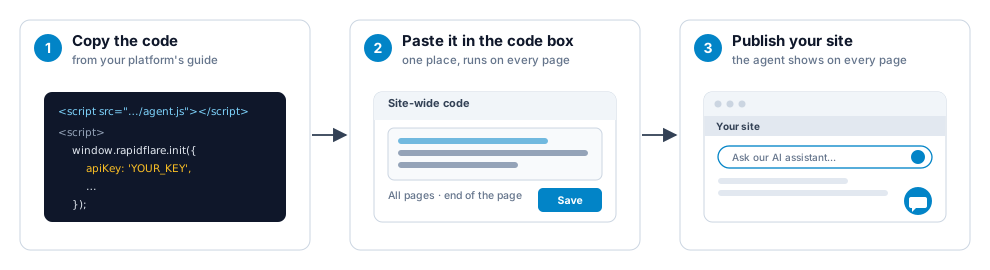
Step 1: Choose your platform
Wix
Add the chat button from Settings → Custom Code. Wix asks for a published site with a connected domain.
WordPress
Paste the code with the free WPCode plugin. Works on sites you host and on WordPress.com paid plans.
Another platform? See Other platforms.
Step 2: Choose how the agent appears
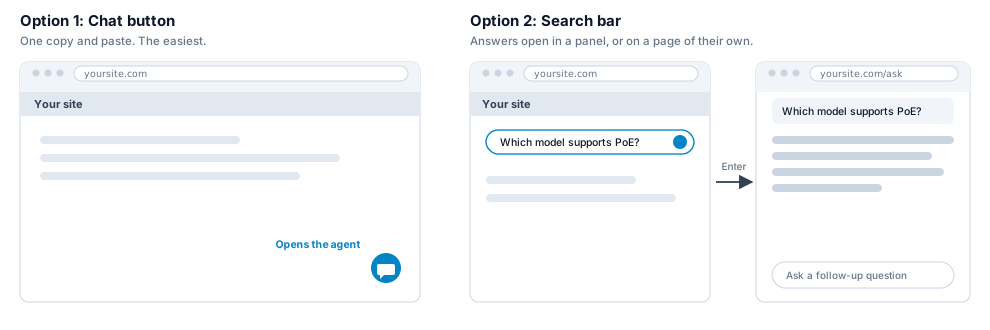
The WordPress guide has copy-paste code for every mode: the chat button, your own button, a search bar, the agent on a page and an AI Overview. The Wix guide covers the chat button: Wix's editor has no reliable way to place the spot the other modes need, and the Wix guide explains why.
What you need
- A publishable API key. Create one in Hubs » Configure » Security. It is safe to paste into your site. See API keys.
- Your site's address on the key's allowed list, for example
example.com. Never add a shared address such aswixsite.com. See Allowed domains. - An account that can add code to your site. Each guide says what that takes.
One rule
Always use your platform's site-wide code box. Do not use an "HTML embed", "Embed code" or iframe block. The agent runs in a separate frame there and fails the domain check.
Check that it works
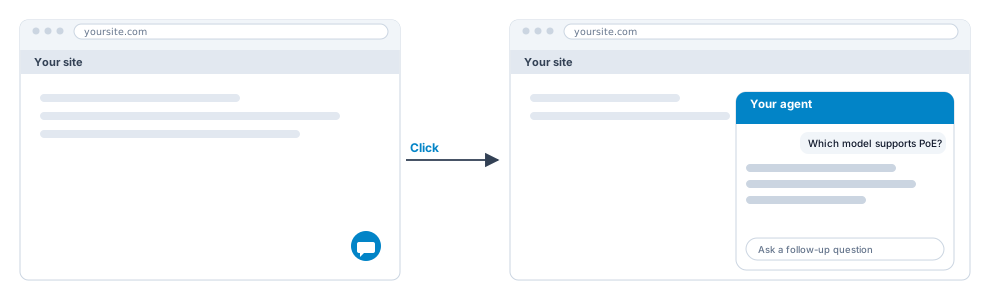
- Open your published site in a private (incognito) window. Most platforms do not run custom code in their editor.
- Look for the chat button, or the search bar, and ask a question.
- Nothing there? Open your browser's developer tools, go to the Console and type
window.rapidflare. An object means the code ran.undefinedmeans it did not.
If something does not work
| What you see | What it usually means | What to do |
|---|---|---|
| Nothing appears | The site is not published, you are in the editor, or the code is in the wrong place | Publish, then open the site in a private window. Check the code is in the site-wide code box. |
| An error instead of an answer | The address you opened is not on your key's allowed list | Add it in Hubs » Configure » Security and reload. |
| The agent looks old after you change its colors or text | Browsers keep the agent's settings for up to an hour | Open your site in a private window. |
| An error and your site has a Content-Security-Policy | The policy blocks the security check | See Content Security Policy. |
Other platforms
Any platform with a footer, or "before the closing body tag", code box works the same way. Follow the closest guide. If your platform only offers an HTML embed or iframe block, contact support@rapidflare.ai about a whitelabel domain that you link to.