
AI Agents
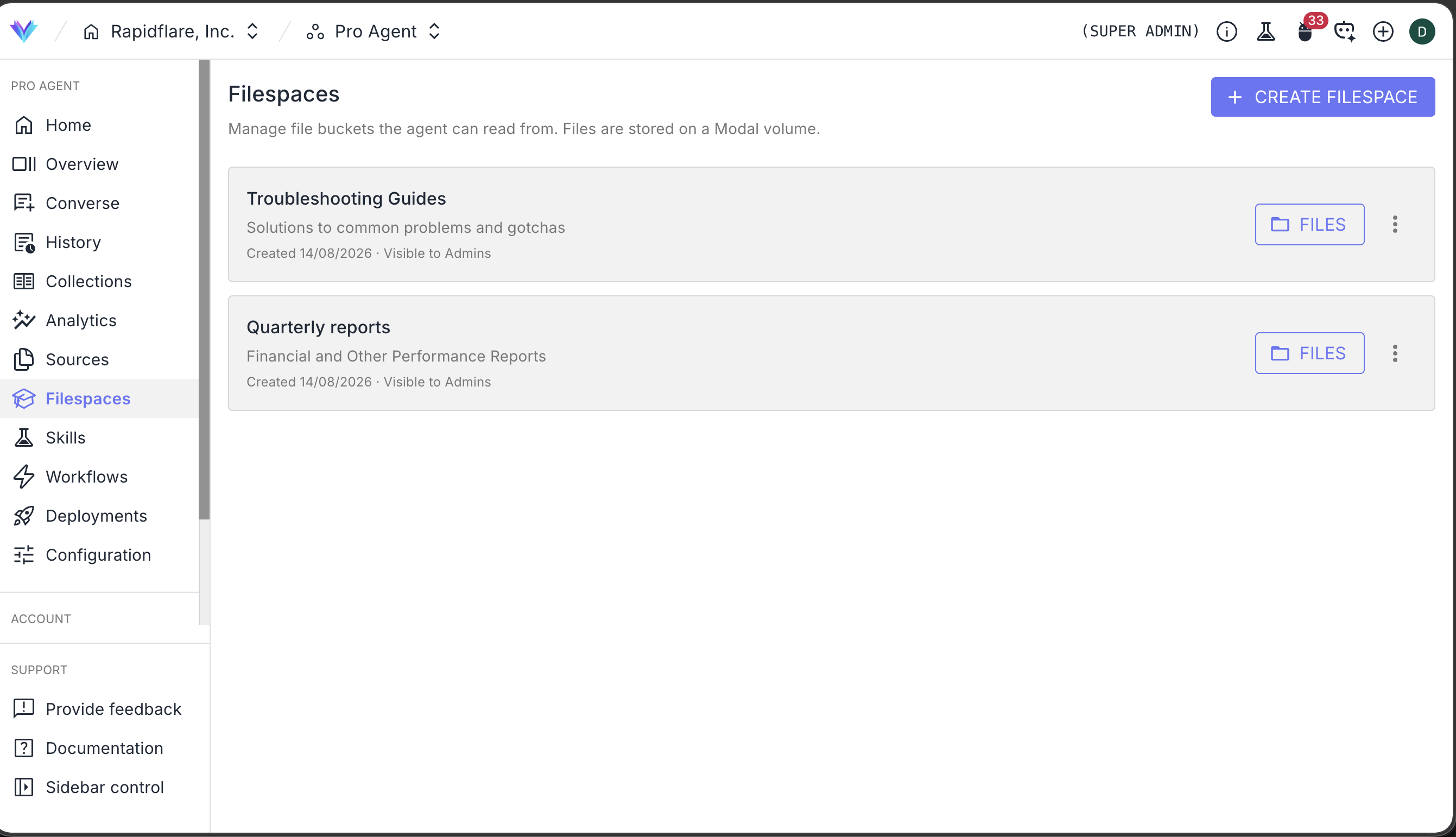
Filespaces
A filespace is a named folder of files that lives on a hub and can be attached to a conversation, so Forge Agent can read the files directly. Think of it as a shelf you stock in advance: a pricing pack, a set of competitor datasheets, last year's RFP responses, a brand kit — anything you want the agent to work from repeatedly without re-uploading it every time.
Filespaces vs. information sources
Both put your content in front of the agent, but they do different jobs.
| Information Sources | Filespaces | |
|---|---|---|
| What happens to the content | Ingested, indexed and made searchable | Stored as files, exactly as uploaded |
| How the agent uses it | Retrieves the relevant passages and cites them | Opens and reads the files themselves |
| Best for | Knowledge to answer questions from | Material to work with — templates, reference packs, data |
| Applies to | Every agent | Forge Agent |
Use Information Sources for the knowledge your agent should be able to answer from. Use filespaces for the documents you want it to open, follow, or build from.
Creating a filespace
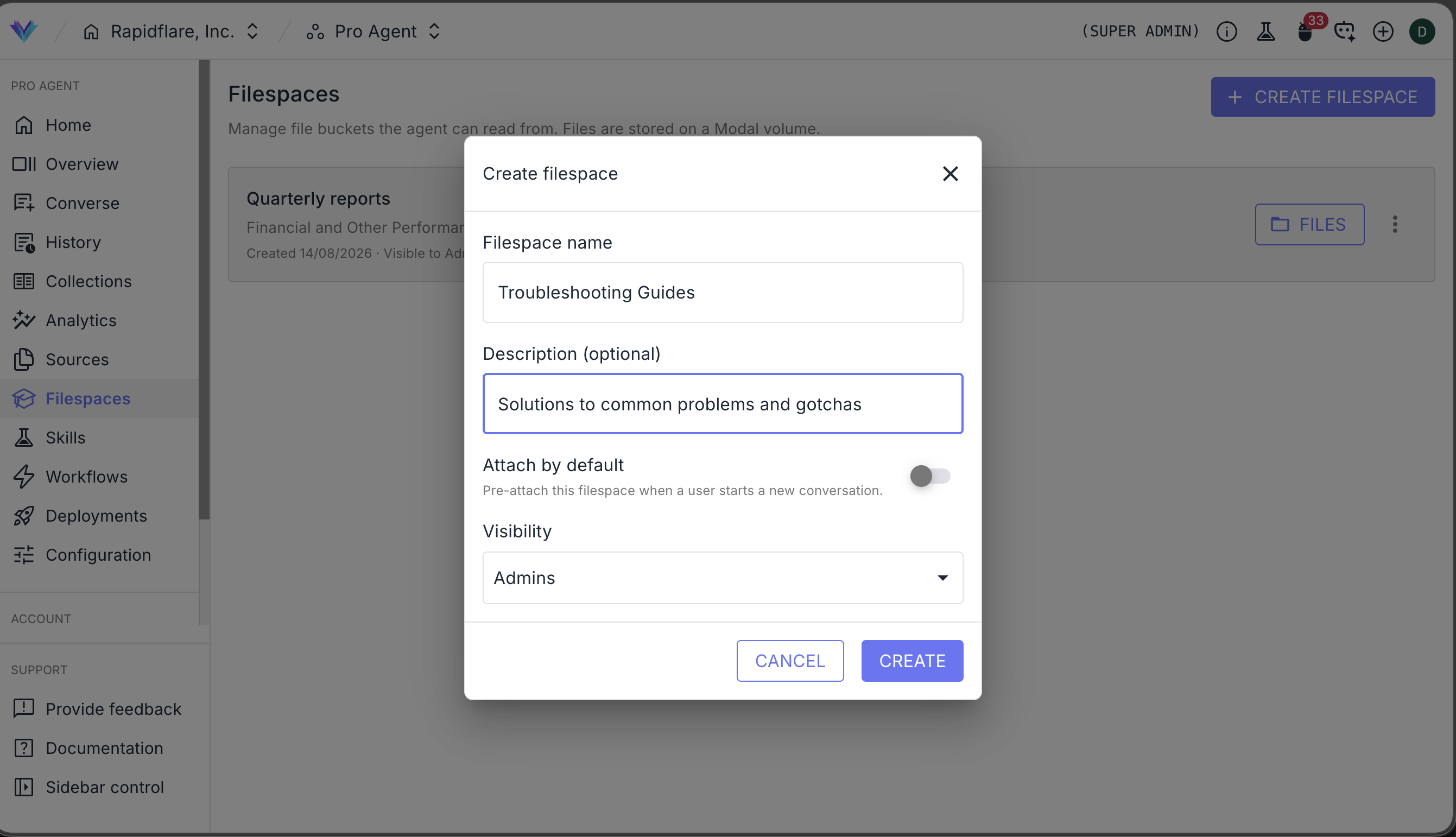
Filespaces are managed per hub, from Filespaces in the Rapidflare dashboard sidebar. Creating one takes four fields:
- Name — how it appears in the picker, and the folder name the agent sees. Keep it short and descriptive.
- Description — optional, but worth writing. It tells both your team and the agent what's in here.
- Visibility — the minimum role that can see and attach it: Members, Admins or Super admins.
- Default — when on, this filespace is attached automatically to every new Forge conversation on the hub.
Visibility
Visibility is a floor, not an exact match: a filespace visible to Members is also visible to admins and super admins. Use it to keep internal-only material — margin data, unreleased specs, competitive teardowns — out of reach of the wider team while still making it available to the agent when an admin runs the conversation.
Default filespaces
Marking a filespace Default attaches it to new conversations on the hub without anyone having to remember. It's the right setting for a filespace almost every conversation needs, like a current price list or a brand guide. Defaults are seeded once per conversation — a user can still remove one, or add others, for that chat.
Adding files
Open a filespace's Files panel to upload. You can drop in individual files or a whole folder, and the folder structure is preserved — so a filespace can mirror the layout your team already uses.
From the same panel you can delete a file or a whole subfolder. From the filespace's row menu you can download everything in it as a single zip.
What to put in a filespace
Filespaces suit material the agent should work from rather than answer from: document templates, reference tables, spreadsheets, style guides, previous deliverables to match, spec sheets, images and logos for decks. Large bodies of general knowledge belong in Information Sources, where they get indexed, searched and cited.
Attaching a filespace to a conversation
In the chat composer, admins and super admins running on Pro Agent can pick which filespaces this conversation should have. Attached filespaces appear as chips next to the message box, and any hub defaults are already selected.
The set is per conversation and can change between turns — attach a second filespace partway through and the agent has it from the next message onward. Reopening an earlier conversation restores the filespaces it was attached to.
The agent sees each attached filespace as its own folder and can list, open and search across them.
How Rapidflare handles filespace files
- Only attached filespaces are ever loaded. Files from a filespace that isn't attached to the conversation are never placed where the agent could reach them — the isolation is physical, not a matter of instructions.
- Filespaces are read-only to the agent. Forge can read and copy from a filespace, but it cannot modify or delete your files. Anything it produces goes to its own workspace and comes back to you as an artifact.
- Visibility is enforced on every request. A user only ever sees, and can only ever attach, filespaces at or below their role tier.
- Files are not indexed or cited. A filespace is a working folder, not a knowledge source. If you want content to be searchable and citable across every agent, add it under Information Sources as well.
Good to know!
Today a filespace holds files you upload to Rapidflare directly. Backing a filespace with a connected content system — so a folder in Google Drive or SharePoint stays in sync — is something we're actively working on. If that's what you need, get in touch at support@rapidflare.ai.