
AI Agents
Skills
A skill is a set of written instructions that teaches Forge Agent how to do something the way your organisation does it. It's a plain Markdown file — a SKILL.md — with a name, a description of when to use it, and the procedure itself. Add one to a hub and the agent picks it up on the next message. No engineering work, no release.
Skills are how you turn a capable generalist into an agent that knows your RFP structure, your datasheet layout, your escalation checklist, or the five steps your team always takes before quoting a custom assembly.
How a skill gets used
The agent doesn't read every skill on every message — that would drown out the actual question. Instead:
- It sees only each skill's name and description.
- When a request matches a description, it opens that skill and reads the full instructions.
- It follows them for the rest of the task.
This is why the description matters more than anything else in the file. It is the only thing the agent uses to decide whether a skill is relevant, so write it as a trigger — "Use this skill when the user asks for a formal RFP response" — rather than as a summary.
Built-in skills
Every Forge Agent ships with skills for producing documents:
pptx— builds a PowerPoint presentation from scratch: slide structure, a colour palette and type pairing chosen for the topic, and a consistent visual motif across slides.pdf— builds a PDF document from scratch: reports, one-pagers, datasheets, proposals, invoices.
These are always available and need no setup. Your own skills sit alongside them.
Writing a skill
A SKILL.md is YAML frontmatter followed by Markdown:
---
name: rfq-response
description: "Use this skill when the user asks for an RFQ or RFP response, a formal quote pack, or a bid document. Trigger on 'RFQ', 'RFP', 'tender', 'bid response'."
---

# RFQ Response

## Workflow

1. Identify every line item in the customer's request and look each one up in the catalog.
2. Flag any item with no exact match — never substitute silently.
3. Pull current pricing from the `pricing-2026` filespace.
4. Produce a PDF with the sections below, in this order.

## Required sections

- Cover letter, addressed to the requesting company
- Line-item table: part number, description, quantity, unit price, lead time
- Substitutions and exceptions, called out explicitly
- Standard terms (copy verbatim from `templates/terms.md` in the filespace)

## House rules

- Lead times are quoted in working days, never calendar days.
- Never quote a discontinued part; offer the successor and say so.
- If any line item is missing pricing, stop and ask rather than estimating.
Frontmatter fields:
| Field | Rules |
|---|---|
name | Lowercase letters, digits and single hyphens (rfq-response). Up to 64 characters. Unique within the hub, and cannot reuse a built-in skill's name. |
description | Up to 1,024 characters. Say when to use the skill, not just what it is — this is the trigger. |
The body is free-form Markdown. Write it as instructions to a capable new colleague: the steps, the order, the house rules, what to do when something is missing. Concrete beats abstract, and short beats exhaustive.
Managing skills on a hub
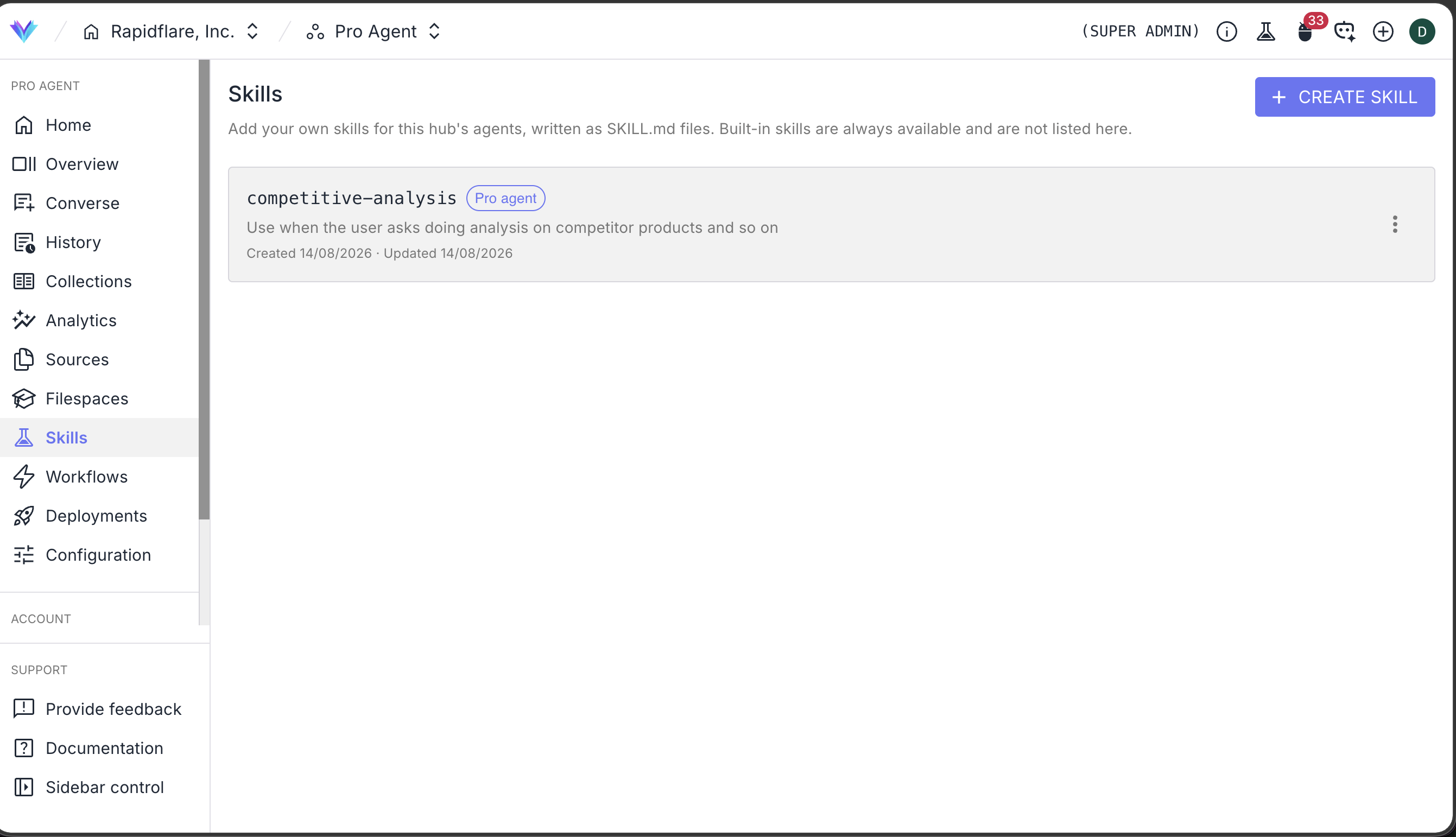
Skills are managed per hub, from Skills in the Rapidflare dashboard sidebar. Each skill has:
- Status —
Activeskills are available to the agent;Draftskills are saved but not served, so you can write one over several sittings. - Runtime — which agent the skill applies to. Today, skills are served to Forge Agent (Pro Agent).
Saving is validated: a missing frontmatter field, an invalid name, an over-long description or a clash with a built-in name is reported back before the skill goes live. Deleting a skill archives it — it stops being served, and its name stays reserved so nothing silently changes meaning.
Edits take effect within about a minute, on the next message. There is no deploy and no re-ingestion.
Skill authoring is currently set up by Rapidflare
Creating and editing skills is limited to Rapidflare super admins while the feature beds in. Send us the procedure you want the agent to follow — a rough written description is enough — at support@rapidflare.ai, and we'll set it up on your hub.
What a skill can and can't do
A skill can:
- Define a procedure, a checklist or a decision rule the agent should follow.
- Fix the structure, tone and section order of a deliverable.
- Tell the agent which of its existing capabilities to reach for, and in what order — catalog lookups, knowledge search, a filespace, the web.
- Encode the exceptions your team knows and no document states.
A skill can't:
- Add a new integration or a new data source. Skills direct the agent's existing capabilities; they don't grant new ones. Connect data through Information Sources and Integrations.
- Carry supporting files. A custom skill today is a single
SKILL.md; put reference material the agent should read in a filespace and point the skill at it. - Hold secrets. Skill contents are readable by the agent as it works, so never put credentials, API keys or anything you wouldn't want quoted back into a skill.
Tips for skills that work
- Write the description as a trigger. List the words a user would actually say. A skill that never fires is a skill that isn't there.
- One job per skill. A single skill covering RFPs, datasheets and support replies will fire in the wrong place. Split them.
- Number the steps. Ordered instructions get followed in order; a wall of prose gets summarised.
- Say what to do when something is missing. "Stop and ask" is a valid instruction, and it's usually the one you want over a plausible guess.
- Point at filespaces by name. If the skill depends on a template or price list, name the filespace in the instructions and make sure it's attached — ideally as a hub default.
- Start in Draft. Write it, save it as a draft, then flip it to Active once you've read it back.